Your laptop is a terrible place for an AI agent to live.
A couple of guys at the office told me how they keep their agents running on the way home. They have something set up to keep their MacBooks awake with the lid closed. Before leaving, they connect to a hotspot, put the laptop in a backpack, and hope the connection holds for the journey.
I get it. I’ve repeatedly wanted to leave while an agent was still working. But keeping a computer awake in a backpack is a lot of effort just to let a task continue.
I never bothered with remote development when most of the work stopped as soon as I left the keyboard. Agents changed that. Now I regularly leave work running, and I want to close my laptop without arranging my evening around it.
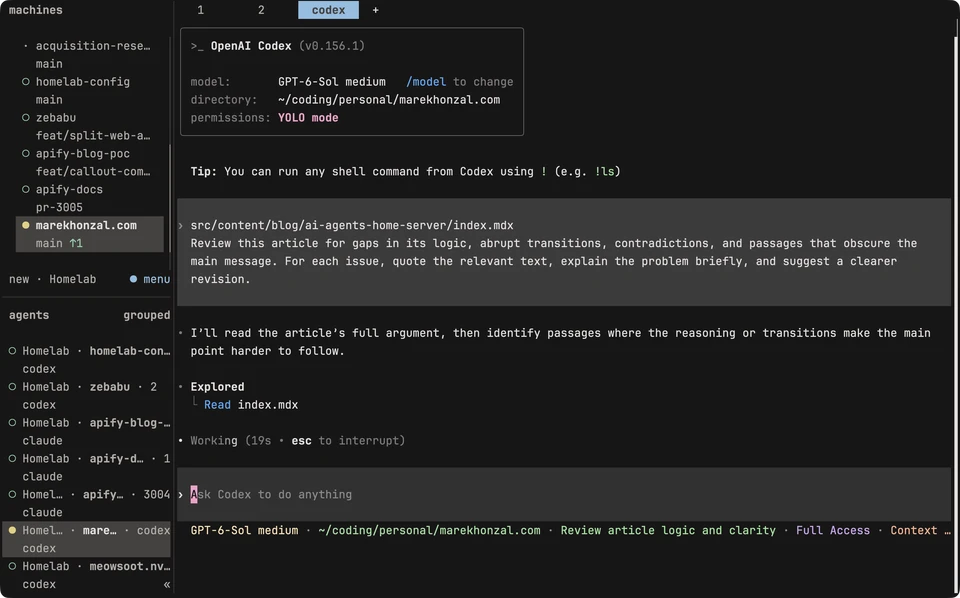
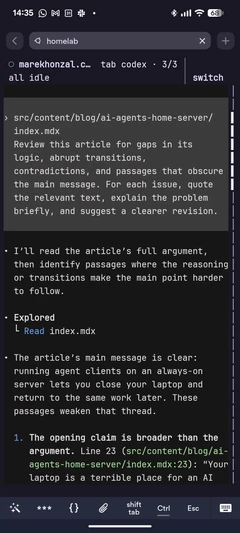
For the past month or two, I’ve run Claude Code and Codex almost exclusively on my home server. Herdr connects my laptop to the server over SSH through Tailscale. When I close the laptop, the work continues. And when I have an idea before bed, I can give the agent a task from my phone and come back to it the next morning.
I’m a terminal guy. I used Neovim before coding agents, and I think the terminal is the best place to work with them: agents, shell, tests, Git, and server administration, all in the same session. If you want a graphical editor and agent interface, this setup isn’t for you.
Leave when you want to leave
Long research tasks benefit from the same setup. Comparing features, reading standards, or investigating possible improvements can take a while. I leave it running and come back to the findings. If the agent needs an answer, I can reconnect from my phone, answer, and let it continue. Or I can leave it waiting until I’m ready.
The benefit is convenience. I don’t want to think about whether my laptop’s battery, Wi-Fi connection, or lid will interrupt the work. I don’t owe my subscription five hours of work every five hours. If the agent finishes and sits idle until tomorrow, good. I’ll review it when I’m ready.
What runs where
My setup has three main pieces:
- Ubuntu Server: The server runs Ubuntu and hosts my repositories, development tools, and agent clients. Builds and tests run there too.
- Tailscale and SSH connect my laptop and phone to the server over Tailscale’s private network. I use Termius for SSH on my phone.
- herdr runs on both my laptop and server. I add the server as an SSH machine in my local Herdr, so its workspaces and agents appear alongside my local ones in one window. Herdr keeps the server sessions running when I disconnect. I used tmux for several years; Herdr adds a sidebar that shows whether each agent is idle, running, done, or blocked, for example waiting for an answer. On my phone, I connect directly to the server’s Herdr instance, where the sidebar collapses into a hamburger menu.
The agent clients and their tools run on my server. The models run at the hosted AI providers. You don’t need to buy hardware for local model inference to do this. Your machine needs to handle your development workload and however many tasks you run at once.
Tailscale lets me reach SSH and my dev servers remotely without exposing them to the public internet. I don’t have to open public ports for either. They can still be reachable on my home LAN, depending on which addresses they listen on. Tailscale’s connection guide explains how to reach services using a device’s Tailscale address.
Disconnecting leaves processes running. A restart stops them; herdr can restore its layout and resume supported agent conversations when I reconnect, with the relevant integrations installed. Dev servers and other processes still need restarting.
The same development loop, from another machine
On my laptop, I start my local Herdr instance with herdr.
I added homelab, a short name in my SSH config, as a
saved machine once. Its workspaces appear
in the same Herdr window as my local work. Switching to one connects me to the Herdr
instance running on the server, without a separate SSH terminal.
On my phone, I connect to the server’s Tailscale address using a saved host in Termius, then run Herdr there to rejoin the server sessions. Inside them, I switch between agents working in different repositories. My usual tools are there too: Fish, Neovim, ripgrep, fzf, Delta, and lazygit. My dotfiles, managed with GNU Stow, keep the environment familiar.
For a web project, I start the dev server in a terminal on the server, just as I would on my MacBook:
pnpm dev --hostIn my projects, --host makes the dev server listen on 0.0.0.0, allowing access from
other devices, including the home LAN. It doesn’t restrict access to Tailscale. Use the
equivalent option for your project’s dev server, then open this in your browser:
http://<server-tailscale-ip>:<dev-port>Use the port printed by the dev server, with your client connected to Tailscale and allowed to reach that port. A resolvable Tailscale device name works too; an SSH shortcut doesn’t automatically become a browser hostname.
The server is headless, with no browser. I test the feature in a real browser on the device I’m holding. Nothing needs to be deployed just for me to try it.
From there, it’s the usual development workflow. I inspect the changes, run tests, try the feature, and ask the agent to commit, push, and open a PR when I’m satisfied. I can also leave it working toward a draft PR and review that later.
The phone is useful for short prompts, answering questions, and reviewing manageable PRs through GitHub. Longer reviews can wait until I’m back at my desk.
The server I actually use
I already had a home server, so adding development to it was an obvious choice. It runs around 20 containers, including Home Assistant and Frigate, which processes camera feeds for object detection. I’ve used this machine for almost four years, replacing every component but the SSD along the way.
I’d set aside a couple of hours for the initial setup and choose a stable distro. Ubuntu
Server has needed little attention from me; I automate updates with cron. Years ago, I ran
Arch, and every sudo pacman -Syu made me wonder what would break. I don’t want that
feeling from the machine I’m leaving my work on.
I started with used parts from Aukro.cz: an i5-9400 machine with 12 GB of RAM for around 8,000 CZK. I upgraded to an Intel Core i5-13500 and 32 GB of RAM so I have headroom for several Claude Code and Codex sessions and dev servers alongside my containers. The server also has one small NVMe SSD and two larger 3.5-inch data HDDs in RAID 1. The original purchase and later RAM, CPU, and motherboard upgrades add up to roughly 17,500 CZK.
My smart socket reports roughly 40 W at the wall during typical use, with the containers, some agent instances, a dev server, and the two data HDDs. That’s an observation from my normal workload, not an idle-power measurement.
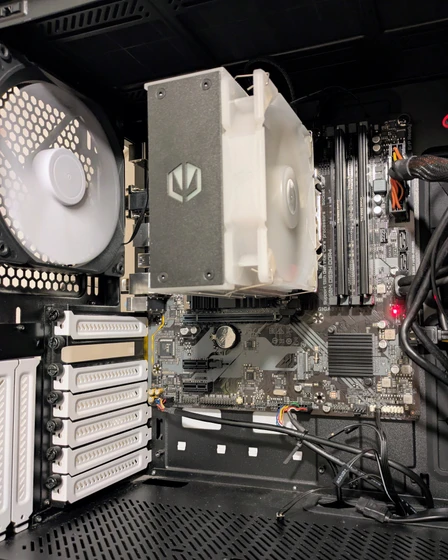
I’d buy an upgradeable tower. I want room for more RAM, storage, and standard replacement parts. Making the box tiny isn’t worth paying extra for. The development workload determines what you need: builds, tests, and containers still consume resources even when the model runs elsewhere.
Try it on a machine you already have
Start with one repository on a spare machine that can stay running, or an existing home server. If you want an agent to guide you through the setup, give it this whole article for context. Use these steps as a checklist:
- Install Ubuntu Server if needed, then your usual development tools and coding agent.
- Set up Tailscale on the server and your client devices, and configure SSH access over that network.
- Install herdr on the server and your
laptop. Clone your project’s repository on the server, then run
herdrthere. Add the server as a machine in your laptop’s Herdr instance. - Start an agent in a Herdr workspace on the server and give it a task.
- Disconnect and return through your laptop’s Herdr instance, or SSH into the server from
your phone and run
herdrthere. For a web project, try opening its dev server in that device’s browser too.
If you’re comfortable in a terminal, move your agents off your laptop. I don’t want a running agent deciding when I can close the lid. Give it work, close the laptop, and leave. It can wait for you when it’s done.